Free wedding budget calculator for Indian weddings
A free wedding budget calculator: split your total in lakhs or build it up cost by cost, plan each function, track deposits and due dates, and see your cost per guest. No sign-up needed.

The Wedding Card Maker wedding budget calculator is free and needs no account. Enter the total you have and it splits it across the usual costs as a starting point, or build your budget up one quote at a time. Then track what is booked, what is paid and what is due next, for one wedding day or every function.
Most Indian weddings are not one bill but many: a mehndi at home, a sangeet in a banquet hall, the wedding, the reception, and a dozen advances paid along the way. The calculator keeps those numbers in one place and does the sums, so the family conversation can be about choices, not arithmetic.
Open the free wedding budget calculator
Step 1: Start with a total, or build it up
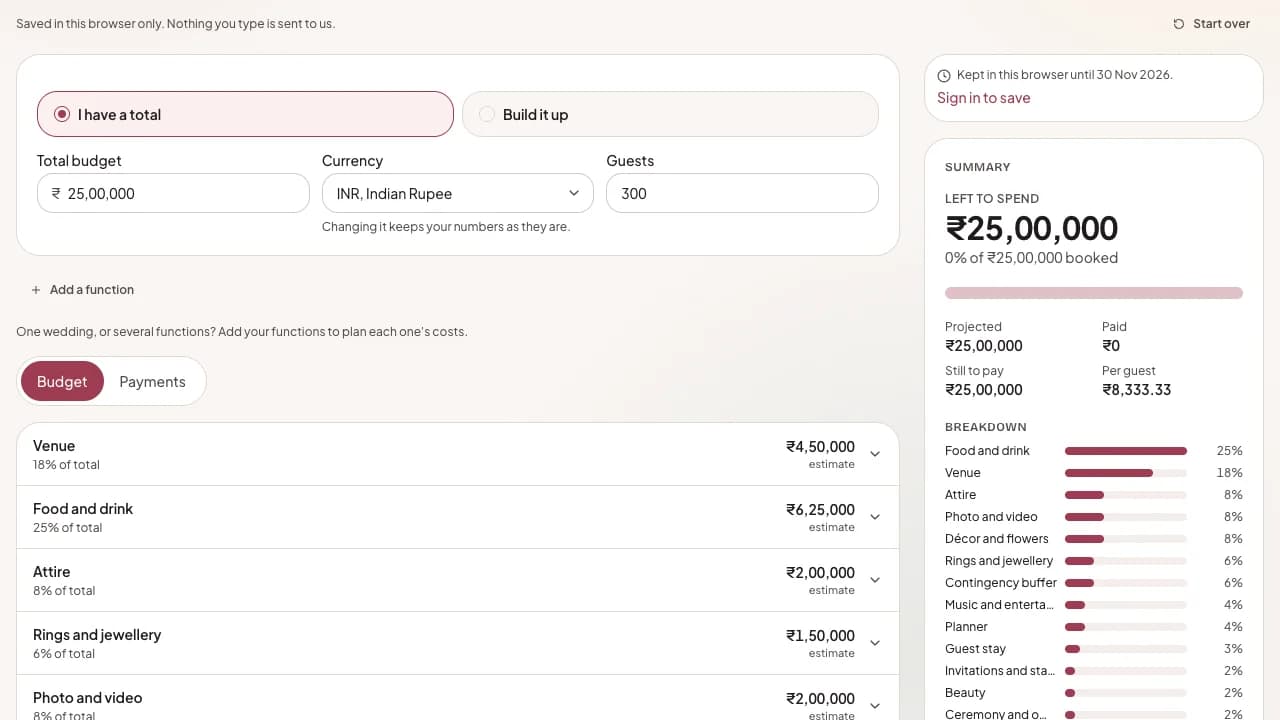
The calculator asks one question first: do you have a total in mind? Choose I have a total, type it in, add your guest count, and every category gets a share. Choose Build it up instead if you are still collecting quotes and would rather add costs as they come.
The currency is picked for where you are, and you can change it at any time. In rupees, amounts are grouped the Indian way, so twenty-five lakh reads ₹25,00,000. Changing the currency keeps your numbers as they are, which helps when a destination wedding is priced in dirhams or pounds.
Step 2: Make the split your own
The starting split puts 25% on food and drink, 18% on the venue, 8% each on attire, photo and video, and décor and flowers, 6% on rings and jewellery, and keeps 6% as a contingency buffer. The rest is spread over music, the planner, guest stay, transport, invitations, beauty, the ceremony, and gifts and favours. None of it assumes a religion, and none of it is a rule.
- Open any category to change its share, rename it or remove it
- Add your own categories, such as ‘Mehndi artist’ or ‘Band baaja’
- If the shares don’t add up to your total, the page says how much is left over or how far over you are
- In Build it up, switch on Priced per guest for catering and enter the price per guest: the estimate follows your guest count
Step 3: Add your functions
Choose Add a function for each event with its own costs, such as the haldi, sangeet or reception, then pick a function to enter what it costs. Costs that belong to the whole wedding, like rings and outfits, sit under Shared. Each function can have its own guest count, which matters when 80 people come to the mehndi and 400 to the reception. The summary always shows the whole wedding.
Step 4: Record what is booked and paid
When you book a vendor, open the category and enter the actual cost. Then add each payment: a deposit, a balance or another instalment, with its amount, its due date and a short note. Switch on Paid when the money goes. The Payments tab lists everything by date, grouped into overdue, due in the next 14 days, later, no date and paid.
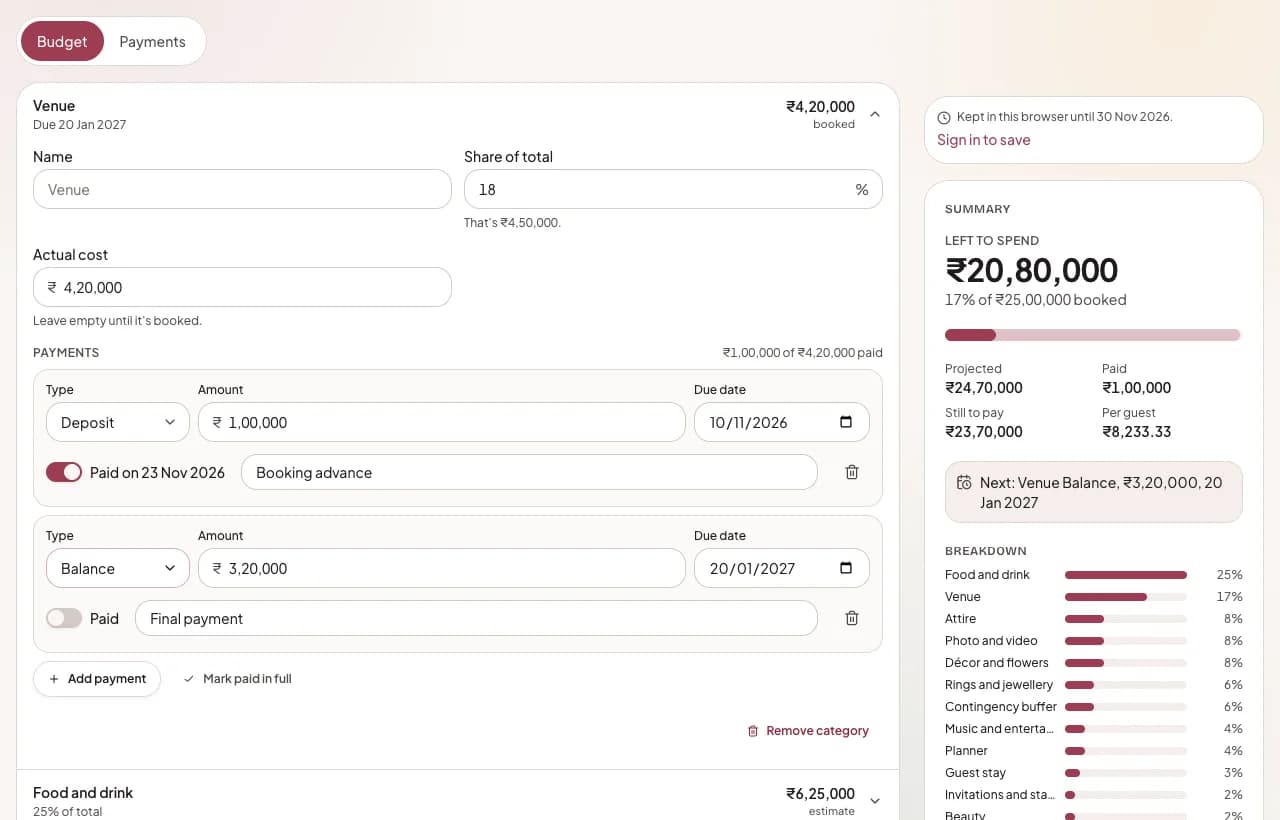
The summary keeps four numbers in view: what is left of your total, what is paid, what is still to pay, and the cost per guest. It warns you when a category goes over its estimate or the whole budget goes over your total, and it shows the next payment due so no advance slips past.
Budget tips from families who have done it
- Agree early on who pays for what between the two families, and write it down
- Price food per plate, per function: it is usually the biggest line, and headcounts differ a lot between events
- Ask every vendor whether a quote includes taxes, travel and overtime before you book
- Keep a contingency of 5 to 10%, and try not to touch it until the last month
- Enter every advance as soon as you pay it, with the receipt in your phone’s photos
Privacy, exports and saving
Without an account, your budget stays only in this browser, for 7 days after your last change, and nothing you type is sent to us. Download CSV gives you two spreadsheets, one of the budget and one of the payments, and Print or save as PDF prints a clean copy. Both are free, with no sign-up.
Saving the budget to your account is part of the paid plans. A saved budget stays until you delete it, can be attached to your invitation, and then takes its guest count from your guest list. You can skip the sign-in prompt and keep using the free calculator as long as you like; just download a CSV now and then.
Free wedding tools: when to send invitations, what to write, and your hashtag
Wedding guest list manager: track RSVPs for every event
Seat every family with the free seating chart maker
Quick answers
- Is the wedding budget calculator free? Yes. You can plan, track payments, download a CSV and print without an account. Only saving to an account needs a paid plan.
- Does it work in rupees and lakhs? Yes. Choose INR and amounts are grouped the Indian way, such as ₹25,00,000. Other currencies are there too.
- How should I split my wedding budget? Start from the suggested split, a quarter on food and drink and nearly a fifth on the venue, then change any share to fit your wedding.
- Can I budget each function separately? Yes. Add your functions, give each its own costs and guest count, and keep shared costs under Shared.
- How long is my budget kept without an account? For 7 days after your last change, in this browser only.
Written by Inviteeq Editorial, with care for every celebration. How we write and check these stories